
Advanced Configuration
You can add the tools, extensions, blocks, localizations you need, and customize them individually according to your preferences.
Blocks
Blocks are the foundation of working with the editor. You can customize them according to your requirements, extend their functionality, or create your own blocks using the existing model.
import Texditor from '@texditor/editor';
import {
  Gallery,
  Files,
  H2,
  List,
  Paragraph
} from '@texditor/editor/blocks';

const editor = new Texditor({
  // HTML element identifier
  handle: 'texditor',
  // List of block models
  blockModels: [
    Paragraph,
    List,

    // Configure a simple block
    H2.setup({
      // Placeholder (if data is not filled)
      placeholder: 'My Heading',
      // Basic sanitization settings
      sanitizerConfig: {
        elements: ['a', 'sup', 'sub']
        // ...
      }
    }),

    /*
      Example of a gallery block that has
      its own configuration parameters.
    */
    Gallery.setup({
      mimeTypes: [
        "image/png",
        "image/jpeg",
        "video/mp4",
        "image/webp"
      ],
      multiple: true,
      uploadLabelMessage: "Upload your files in .png, .jpg, .mp4, or .gif formats",
      showOnlyWhenEmpty: true,
      stylesLtr: "left",
      styles: [],
      defaultStyle: 'slider',
      ajaxConfig: {
        url: "https://texditor.priveted.com/api/upload",
        options: {
          data: {
            hello: 33
          }
        }
      }
    }),

    /*
     Although this element will function as a block,
     it requires configuration similar to that used in the "Gallery" block for file uploads.
    */
    Files,

    // ... Any custom block that conforms to the BlockModel model and BlockModelInterface interface.
  ]
});
For more detailed configuration of each block and to learn about its specifics, refer to the API.
Block Actions
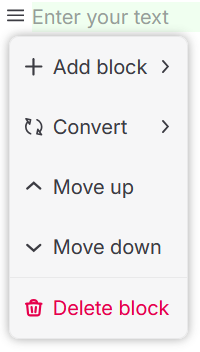
Block actions open up extensive possibilities for their processing. You can delete, create new blocks, convert, and move them, as well as add your own unique functions.
import Texditor from '@texditor/editor';
import { Undo, Redo, SelectionMode } from "'@texditor/editor/extensions';"

const editor = new Texditor({
  // HTML element identifier
  handle: 'texditor',
  actions: [
    CreateAction,
    ConvertAction,
    DeleteAction,
    MoveUpAction,
    MoveDownAction,
    //... or custom options
  ],
});
Tools
Tools allow you to modify the text content of blocks. As with blocks, you can use ready-made options, make changes using class extensibility, or create your own tools. However, it is worth noting that tools do not have additional settings that would allow them to be quickly adapted to specific tasks.

import Texditor from '@texditor/editor';
import { H1 } from '@texditor/editor/blocks';
import {
  BoldTool,
  ItalicTool,
  InlineCodeTool,
  LinkTool,
  MarkerTool,
  SubscriptTool,
  SuperscriptTool,
  ClearFormatingTool
} from '@texditor/editor/tools';

const editor = new Texditor({
  // HTML element identifier
  handle: 'texditor',
  // List of tools
  tools: [
    BoldTool,
    ItalicTool,
    InlineCodeTool,
    LinkTool,
    MarkerTool,
    SubscriptTool,
    SuperscriptTool,
    ClearFormatingTool,
    //... or custom options
  ],

  /*
  Here we can use an optional parameter
  to select the tools that will be displayed in the block,
  based on their symbolic codes.
  */
  blocks: [
    H1.setup({
      tools: [
        "link",
        "subscript",
        "superscript",
        "clearFormating"
      ]
    })
  ],
});
Extensions
Extensions in the editor are designed to add functions to the extension panel. With their help, you can implement both standard operations—undo (Undo) and redo (Redo)—and any custom actions.

import Texditor from '@texditor/editor';
import { Undo, Redo, SelectionMode } from "'@texditor/editor/extensions';"

const editor = new Texditor({
  // HTML element identifier
  handle: 'texditor',
  extensions: [
    Undo,
    Redo,
    SelectionMode,
    //... or custom options
  ],
});
Localization
Add translations for editor functions based on existing language packs or create your own. Currently, the project has translations available in English and Russian.
import Texditor from '@texditor/editor';
import { RuLocale, EnLocale } from "@texditor/editor/locales";
// Your custom language pack
import CustomFrLocale from '../path/to/locales/fr'

const editor = new Texditor({
  // HTML element identifier
  handle: 'texditor',
  // Optional parameter if localization other than "en" is not used
  locale: "ru"
});

// Register the language pack
editor.i18n.setLocale("ru", RuLocale);
// Pre-installed, does not require registration
editor.i18n.setLocale("en", EnLocale);
// Use your custom language pack
editor.i18n.setLocale("fr", CustomFrLocale);